Your queue on the waiting-room TV, called token by token
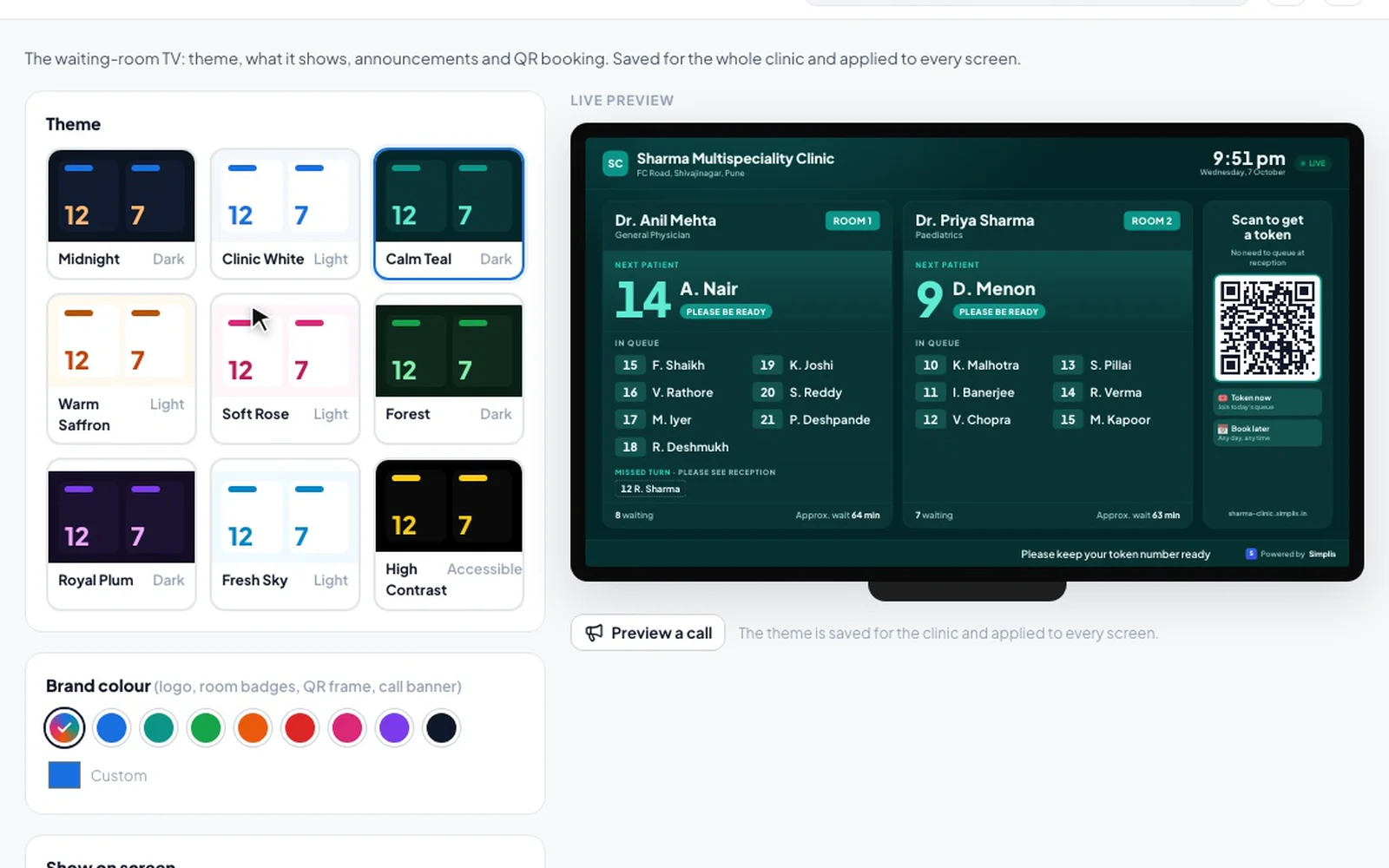
Open the queue display on a TV connected to the clinic computer. Patients see who is next and where they stand for each doctor. When a consultation starts, the TV calls the token with the room and doctor — no shouting names at reception.
Your data is not for sale. Never sold or shared with pharma, marketers or data brokers. How we handle data
Fictional clinic and patients, real product.
What you get
Waiting-room TV in Simplis
Less work at the reception desk
Starting a consultation on the Today screen calls that token on the TV automatically. Staff can also Call next, Recall, Skip or set a short break from Queue control.
Tokens and short names
Choose how patients appear: token with a short name like “R. Sharma”, first name with an initial, or token only.
One screen or one per cabin
Show every doctor on a common screen, or one doctor per screen outside each cabin, with room numbers you set.
Clear call announcements
Each call fills the screen with the token, room and doctor, with a chime and a spoken English announcement. A second line can be in Hindi, Marathi, Gujarati or Tamil.
Scan the QR for a token
Patients scan the QR on the TV to join today’s queue or book another day, verify their number on WhatsApp, and follow their token live on their phone.
Tokens only at the clinic
Turn on the location check or a daily-changing QR so tokens can’t be taken from home, or let reception approve QR tokens first.
How it works
In your clinic, step by step
- 1
Connect a TV
Use the TV as a second screen of the reception PC, or open a no-login display link on a TV that has its own PC.
- 2
Open the queue display
On Today, click Queue display and pick the TV, the layout and the doctors. It opens full-screen.
- 3
Choose the look
Pick one of nine themes, a brand colour, room labels, the announcement language and what to show.
- 4
Call patients
Start the consultation or press Call next. Not there? Skip — the token moves to “Missed turn · please see reception”.
FAQ
Waiting-room TV: common questions
Do I need special hardware?
No. Any TV you can connect to the clinic computer as a screen works. Simplis opens the queue display full-screen on it in the browser. A TV with its own PC can use a no-login display link instead, which you can revoke from settings.
Will other patients see full names?
No. The TV shows a token with a short name such as “R. Sharma”, a first name with an initial, or only the token — you choose in Settings → Queue display.
Can patients take a token from home?
You can stop that: turn on the location check so tokens from the QR work only near the clinic, switch on a daily-changing QR code, or have reception approve every QR token first.
Which languages are used for calls?
The call banner shows the token, room and doctor, with an optional second line in Hindi, Marathi, Gujarati or Tamil. The spoken announcement is in English.
Related features
Online booking & clinic website
Your own clinic web page with live slots, a booking calendar and QR check-in for walk-ins.
Learn more →WhatsApp reminders
Booking confirmations, reminders, running-late alerts and prescriptions sent to patients on WhatsApp.
Learn more →Pre-intake by nurse
Your nurse or assistant records vitals and the patient’s story before the patient reaches your table.
Learn more →
Try waiting-room tv in your OPD
Set up in minutes with your specialty template. First month free — ₹0 today.